


When it comes to building a powerful PC, choosing the right motherboard is key.
EATX boards, like the ASRock X870E Taichi Lite and MSI MEG X870E GODLIKE, are making waves in 2026. They’re packed with features that support the latest processors and offer remarkable memory capabilities.
Whether you’re gaming or multitasking, these motherboards promise to elevate your setup.
Curious about which models truly stand out? Let’s explore the top contenders!
Key Takeaways
- The top E-ATX motherboards support the latest AMD Ryzen and Intel Core Ultra processors, ensuring compatibility with future upgrades.
- High memory capacities up to 256GB and speeds exceeding 8200 MHz provide optimal performance for gaming and multitasking.
- Advanced power delivery systems with multiple power phases ensure stability, crucial for high-performance builds and overclocking.
- Extensive connectivity options, including Wi-Fi 7 and PCIe 5.0, accommodate modern devices and enhance online experiences.
- Effective cooling solutions and thermal management technologies prevent overheating, ensuring system longevity and reliability during intense use.
| ASRock X870E Taichi Lite AM5 Motherboard 256GB | Best Value | Socket Type: AM5 | Memory Technology: DDR5 | Maximum RAM Capacity: 256 GB | VIEW ON AMAZON | Read Our Analysis | |
| MSI MEG X870E GODLIKE E-ATX Motherboard |  | Performance Powerhouse | Socket Type: AM5 | Memory Technology: DDR5 | Maximum RAM Capacity: 128 GB | VIEW ON AMAZON | Read Our Analysis |
| ASUS ROG Crosshair X870E AM5 Motherboard |  | Premium Gaming | Socket Type: AM5 | Memory Technology: DDR5 | Maximum RAM Capacity: 256 GB | VIEW ON AMAZON | Read Our Analysis |
| ASUS ROG MAXIMUS Z890 EXTREME Motherboard |  | Cutting-Edge Innovation | Socket Type: LGA 1851 | Memory Technology: DDR5 | Maximum RAM Capacity: 192 GB | VIEW ON AMAZON | Read Our Analysis |
| GIGABYTE X870E AORUS Xtreme Motherboard (E-ATX) | 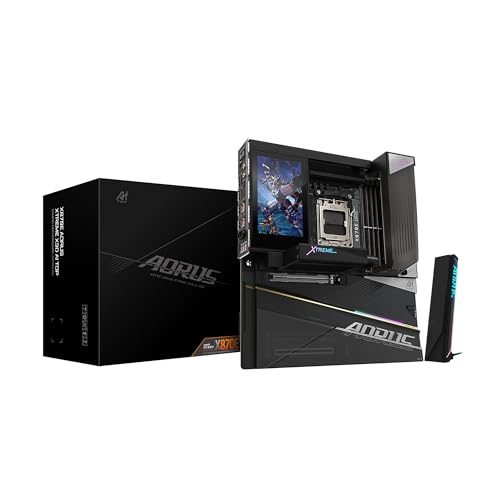 | High-End Versatility | Socket Type: AM5 | Memory Technology: DDR5 | Maximum RAM Capacity: 256 GB | VIEW ON AMAZON | Read Our Analysis |
| GIGABYTE TRX50 AERO D Motherboard |  | Ultimate Content Creator | Socket Type: AMD sTR5 | Memory Technology: DDR5 | Maximum RAM Capacity: 1 TB | VIEW ON AMAZON | Read Our Analysis |
More Details on Our Top Picks
ASRock X870E Taichi Lite AM5 Motherboard 256GB
The ASRock X870E Taichi Lite AM5 Motherboard is like a superhero for gamers and creators alike, boasting a jaw-dropping 256GB of memory capacity! This EATX motherboard supports the powerful AMD Ryzen 7000, 8000, and 9000 series processors.
With a lightning-fast memory clock speed of 8200 MHz, it guarantees smooth gameplay and quick rendering. Plus, it features four M.2 sockets for speedy storage upgrades! Connectivity is a breeze with 15 USB ports and 5G LAN.
Its tool-less heatsink keeps things cool, while the Ultimate VRM Power system assures stability. It’s a solid choice for anyone looking to enhance their build!
- Socket Type:AM5
- Memory Technology:DDR5
- Maximum RAM Capacity:256 GB
- Form Factor:EATX
- USB Ports:15 total
- Warranty:1 year
- Additional Feature:5G LAN connectivity
- Additional Feature:Toolless Multi-Layer heatsink
- Additional Feature:USB4 onboard
MSI MEG X870E GODLIKE E-ATX Motherboard
For gamers and tech enthusiasts who crave top-tier performance, the MSI MEG X870E GODLIKE E-ATX motherboard stands out like a beacon of power. This beauty supports AMD Ryzen 9000, 8000, and 7000 series processors, ensuring you’re ready for the latest tech.
With a whopping 24 DRPS VRM and DDR5 memory speeds hitting over 9000 MT/s, your gaming sessions will be smooth and lightning-fast. Connectivity? It’s got Wi-Fi 7, Bluetooth 5.4, and all the ports you could dream of.
Plus, its sleek design and cooling features make it a showstopper in any build. Get ready to elevate your game!
- Socket Type:AM5
- Memory Technology:DDR5
- Maximum RAM Capacity:128 GB
- Form Factor:E-ATX
- USB Ports:USB4 Type-C (multiple)
- Warranty:3 years
- Additional Feature:Wi-Fi 7 support
- Additional Feature:Dynamic Dashboard III
- Additional Feature:Double-sided EZ M.2 Shield
ASUS ROG Crosshair X870E AM5 Motherboard
Looking to power up a gaming rig or a high-performance workstation? The ASUS ROG Crosshair X870E AM5 Motherboard is a powerhouse that’s ready to impress!
With support for the latest AMD Ryzen processors and a whopping 256 GB of DDR5 memory, it’s built for speed. Plus, it boasts WiFi 7 and PCIe 5.0 for lightning-fast connectivity.
Need more slots? This beauty has seven M.2 slots! The 5” full-color LCD is a cool touch for system monitoring. With AI features to boost performance, it’s like having a little helper.
- Socket Type:AM5
- Memory Technology:DDR5
- Maximum RAM Capacity:256 GB
- Form Factor:E-ATX
- USB Ports:26 total
- Warranty:3 years
- Additional Feature:5” full-color LCD
- Additional Feature:AI Overclocking features
- Additional Feature:Premium ROG aesthetics
ASUS ROG MAXIMUS Z890 EXTREME Motherboard
Gamers and tech enthusiasts will find themselves drooling over the ASUS ROG MAXIMUS Z890 EXTREME Motherboard. This powerhouse is built for the latest Intel Core Ultra Processors, bringing speed and performance to the forefront.
With a whopping 24+2+1+2 power stages, it’s like having a turbocharger for your PC! Plus, it supports up to 192 GB of DDR5 memory—talk about future-proof!
Connectivity is a breeze with WiFi 7 and Thunderbolt™ 5. And let’s not forget that nifty 5” LCD screen for monitoring. It’s the perfect blend of tech wizardry and user-friendly design—what’s not to love?
- Socket Type:LGA 1851
- Memory Technology:DDR5
- Maximum RAM Capacity:192 GB
- Form Factor:E-ATX
- USB Ports:20 total
- Warranty:3 years
- Additional Feature:NitroPath DRAM Technology
- Additional Feature:Thunderbolt™ 5 support
- Additional Feature:AI applications optimization
GIGABYTE X870E AORUS Xtreme Motherboard (E-ATX)
The GIGABYTE X870E AORUS Xtreme Motherboard is a powerhouse for anyone ready to plunge into high-performance computing. This E-ATX marvel supports AMD’s latest Ryzen processors, offering a sleek and robust design.
With a digital power phase of 24+2+2, it keeps everything running smoothly, even under pressure. Need speed? It boasts DDR5 memory support with a whopping 256 GB capacity. Plus, five M.2 slots mean you’ll never run out of storage.
And let’s not forget the 12 USB ports—perfect for all your gadgets! This board isn’t just functional; it’s a gamer’s dream come true!
- Socket Type:AM5
- Memory Technology:DDR5
- Maximum RAM Capacity:256 GB
- Form Factor:E-ATX
- USB Ports:12 total
- Warranty:5 years
- Additional Feature:8-layer PCB design
- Additional Feature:Integrated I/O shield
- Additional Feature:5 M.2 slots
GIGABYTE TRX50 AERO D Motherboard
For those diving into the world of high-performance computing, the GIGABYTE TRX50 AERO D Motherboard stands out like a beacon of power and potential. This E-ATX marvel is designed for AMD’s Threadripper PRO 7000 Series, boasting a robust 16+8+4 phase digital VRM solution.
With support for up to 1 TB of super-fast DDR5 RAM, it’s a dream for gamers and creators alike. Plus, it offers plenty of connectivity options, including dual USB4 Type-C ports and lightning-fast 10GbE networking.
With stellar thermal management, this motherboard keeps cool under pressure, perfect for those intense gaming nights or heavy workloads.
- Socket Type:AMD sTR5
- Memory Technology:DDR5
- Maximum RAM Capacity:1 TB
- Form Factor:E-ATX
- USB Ports:10 total
- Warranty:Manufacturer’s warranty available
- Additional Feature:1 TB maximum RAM
- Additional Feature:VRM Thermal Armor
- Additional Feature:Designed for heavy workloads
Factors to Consider When Choosing Eatx Motherboards
When choosing an EATX motherboard, there are a few key factors to keep in mind. Think about features like processor compatibility and memory capacity. You don’t want to buy a fancy board only to find out it doesn’t play nice with your parts!
Plus, consider the connectivity options and cooling solutions. Nobody wants their rig to overheat during an epic gaming session, right?
Key Features Overview
Choosing the right E-ATX motherboard can feel like searching for a needle in a haystack, especially with so many options out there. One key feature to look for is RAM capacity—many E-ATX boards support up to 256 GB. That’s perfect for gamers and heavy multitaskers.
Storage enthusiasts will love models with multiple M.2 slots, sometimes up to seven, for all their favorite games and files. Don’t forget about power delivery: advanced systems guarantee stable performance, especially if you’re planning to overclock.
Connectivity is also a big deal; expect plenty of USB ports and the latest PCIe standards. Finally, integrated cooling solutions keep everything running smoothly, which is a must when things heat up!
Compatibility With Processors
Finding the right E-ATX motherboard can feel a bit like dating; there’s a lot to contemplate before making a commitment! First up, you need to check the socket type, like AM5 or LGA 1851. This will tell you which processors, like AMD Ryzen or Intel Core, are on the menu.
Next, consider the motherboard’s chipset, such as the AMD X870E, as it defines compatibility and capabilities. Many boards support multiple generations, so you can upgrade later without hassle! Also, look at the power phases and VRM design for stable performance, especially if you’re into overclocking.
Finally, don’t forget about RAM capacity and technology—these factors guarantee your processor runs smoothly. Choose wisely, and your build will thank you!
Memory Capacity Considerations
How much memory does one really need for an E-ATX motherboard? It’s a great question! E-ATX boards can support a whopping 256 GB or more, which is fantastic if you’re into multitasking or heavy gaming. Imagine running multiple applications without breaking a sweat!
Plus, many of these motherboards have four or more DIMM slots, so upgrading memory is a breeze as your needs grow. Don’t forget about speed! With some models hitting up to 8200 MHz, your data transfers will zoom.
And let’s not skip on compatibility; going for DDR5 is key to keeping your system future-proof. So, consider both memory capacity and speed to maximize your performance and avoid those frustrating slowdowns. Happy building!
Connectivity Options Available
When it comes to E-ATX motherboards, connectivity options can feel like a treasure trove waiting to be explored! These boards typically offer a whopping 12 to 26 USB ports, perfect for all your gadgets—because who doesn’t love more ports?
Advanced networking features like Wi-Fi 7 and multi-gigabit Ethernet turbocharge your internet, making gaming and streaming smoother than a buttered slide. Need storage? With 4 to 7 M.2 slots for NVMe SSDs, you can zip through data like a pro. Plus, PCIe 5.0 slots keep your graphics cards and devices speedy.
And let’s not forget integrated audio solutions that deliver 7.1 surround sound, perfect for movie nights or epic gaming sessions. Immerse yourself and enjoy the connections!
Cooling Solutions Effectiveness
Cooling solutions are often the unsung heroes in the world of E-ATX motherboards. They keep your system running smoothly, especially when you’re powering high-end processors and graphics cards that love to heat things up! Features like direct-touch heat pipes and thermal pads are like little ninjas, whisking heat away from essential components.
The layout matters too; good designs with smart airflow can be game-changers. Plus, having multiple fan headers lets you adjust cooling on the fly—no more sweaty systems during heavy gaming sessions! Don’t forget about quality thermal interface materials; they’re the secret sauce for better heat transfer.
Power Supply Requirements
Selecting the right power supply for an E-ATX motherboard is like picking the perfect partner for a dance: it’s all about compatibility and strength! E-ATX boards often crave a beefy power supply, typically between 750W and 1000W, to keep all those high-performance parts humming.
Think of the power phases in the motherboard’s VRM as the dance partners. More phases, like 24+2+2, mean smoother moves and better stability. Don’t forget those extra connectors! Most E-ATX boards need additional 8-pin or 4-pin CPU power connectors to really shine.
Plus, with advanced cooling solutions, like improved thermal pads, power efficiency gets a boost. Remember, higher RAM and clock speeds demand more juice, so pick wisely to keep your build rocking!
Warranty And Support Options
Also, check for support options. Good customer service, helpful online resources, and community forums can be lifesavers when things go haywire. Some brands even throw in cool perks, like free software or tech help.
Don’t forget to read the fine print on what’s covered—VRMs and ports matter! Furthermore, knowing the return policy for defective items can save you from a headache later. So, choose wisely and build with confidence!
Frequently Asked Questions
What Is the Advantage of E-Atx Over Standard ATX Motherboards?
E-ATX motherboards offer some cool advantages over standard ATX boards. First, they have more space for additional components, like extra RAM slots and PCIe slots for graphics cards. This means more power for gaming or heavy tasks!
Plus, their larger size often leads to better cooling solutions. Think of it as a bigger pizza—more toppings and less chance of a soggy slice. Who doesn’t want that? It’s like upgrading to first class in tech!
How Do E-Atx Motherboards Impact Cooling Performance?
E-ATX motherboards can feel like the superhero of cooling performance! With extra space, they allow for better airflow and more fan connections, helping to keep temperatures down. This means gamers and builders can push their systems harder without overheating.
Plus, the layout usually accommodates larger coolers and radiators, making it easier to build a cooling setup. So, if heat is your nemesis, consider E-ATX your trusty sidekick in the battle!
Are E-Atx Motherboards Compatible With All PC Cases?
E-ATX motherboards aren’t compatible with all PC cases, and that’s a bummer! They’re like the big kids on the block, needing extra space. Many mid-tower cases can’t handle their size.
What Types of RAM Are Supported by E-Atx Motherboards?
E-ATX motherboards typically support a variety of RAM types, mainly DDR4 and DDR5. This means users can choose from multiple speeds and capacities to match their needs. It’s like picking toppings for a pizza: everyone has their favorite!
Just remember, not all motherboards will support every RAM type, so checking the specs is key. With the right RAM, users can unlock their builds’ true potential and maybe even impress their friends!
Can I Use an E-Atx Motherboard for a Compact Build?
Using an E-ATX motherboard in a compact build? It’s like trying to fit a giraffe in a Mini Cooper—challenging but not impossible! While E-ATX boards are larger, they can still squeeze into certain cases.
Just make sure your chassis supports it, as space is key. If you’re up for a little DIY creativity, you might just pull it off!
Just remember, compact doesn’t mean cramped; give your components some space to breathe!



