


Deciding whether you need a new motherboard for a new CPU is the most common hurdle when planning a PC build or an upgrade. Many users assume that because the physical slot looks the same, the parts should work together, but this is rarely the case. Modern processors rely on specific chipsets and electrical requirements that change frequently.
Understanding these hardware dependencies is vital to avoid damaged components or a system that simply refuses to boot. Whether you are aiming for a massive performance leap or just a modest refresh, knowing the compatibility rules ensures your investment delivers the expected results without unnecessary headaches or wasted spending.
Understanding CPU Socket Compatibility
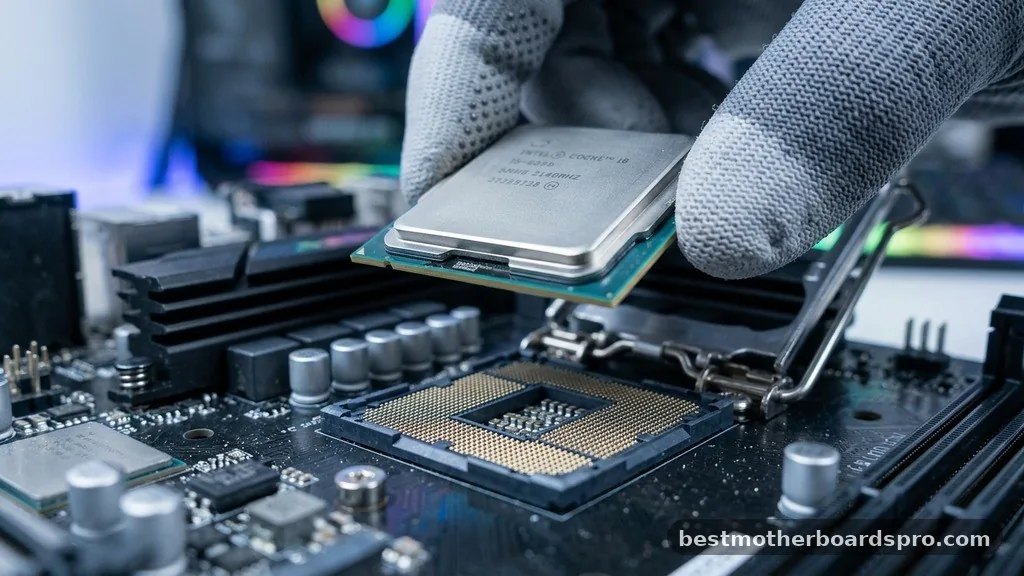
The physical interface between a processor and the mainboard is known as the socket. Every generation of silicon often introduces a new layout or pin configuration, which means you cannot simply drop a modern chip into a legacy board. If the socket type on your current board does not match the requirements of your new processor, the physical installation will be impossible.
Beyond the physical shape, the motherboard needs to electrically support the processor. Manufacturers like Intel and AMD use different strategies for socket longevity.
Intel often changes its socket architecture every two generations, while AMD has historically supported sockets for longer durations, though this is shifting with the move to newer memory standards. Always check the official support list on the manufacturer’s website before assuming a physical fit equates to functional compatibility.
The Role of Chipsets in Performance
The chipset acts as the traffic controller for your computer, managing communication between the processor, memory, and various expansion cards. Even if a processor fits into the socket, the motherboard’s chipset must be programmed to recognize and operate that specific silicon. A board might physically hold a new chip, but if the BIOS lacks the necessary microcode, the system will remain unresponsive.
Upgrading to a newer chip often requires a board with a matching chipset to unlock features like faster PCIe lanes, expanded connectivity, or overclocking capabilities. Older chipsets may lack the power delivery phases required to handle the thermal output of a high-end modern processor. Using an incompatible chipset can lead to thermal throttling, instability, or a complete lack of power delivery to the CPU.
Comparing Component Requirements
When evaluating your build, it helps to see how the core components interact across different generations. The following table highlights the critical differences between older and newer platform standards.
| Component | Older Generation (e.g., DDR4 Era) | Newer Generation (e.g., DDR5 Era) |
|---|---|---|
| RAM Support | DDR4 (Lower frequency) | DDR5 (High bandwidth) |
| PCIe Standard | PCIe 3.0/4.0 | PCIe 5.0 |
| Power Delivery | Standard ATX 12V | Enhanced VRM/EPS requirements |
| Socket Type | Legacy (e.g., LGA 1200, AM4) | Modern (e.g., LGA 1700, AM5) |
Memory and Storage Considerations

The transition to a new motherboard is often dictated by the memory standard. If you are moving to a platform that requires DDR5, your existing DDR4 sticks will not fit. Memory slots are keyed differently to prevent accidental damage, meaning a motherboard swap is inevitable if your target processor mandates a different RAM generation.
Storage performance is also tied to the motherboard’s capabilities. While older drives are usually backwards compatible, you might want to leverage faster NVMe speeds offered by modern PCIe lanes. If your current board relies on older SATA connections or limited M.2 slots, upgrading the motherboard allows you to utilize the full potential of your high-speed storage, preventing the system from being bottlenecked by outdated data transfer protocols.
Power Supply and Case Compatibility
When you decide that you need a new motherboard for a new CPU, you must also look at your power supply unit. Modern motherboards often require additional 8-pin or even 12-pin CPU power connectors to handle increased energy demands. If your power supply lacks these cables, or if its wattage is insufficient, you will face stability issues regardless of the hardware quality.
Cases also play a role in this decision. While most motherboards follow the standard ATX form factor, some high-end boards are bulkier or have different spacing for heat sinks. Ensure your chassis can accommodate the physical dimensions of the board and provides adequate airflow to keep the new components cool under load.
Common Scenarios for Motherboard Replacement
Deciding when to upgrade involves weighing the cost of a new board against the performance gains of the processor. Consider the following scenarios:
- You are moving from an Intel 10th generation to a 14th generation chip, which requires a completely different socket and chipset.
- You want to transition from DDR4 memory to the significantly faster DDR5 standard for better gaming and productivity performance.
- Your current motherboard lacks the PCIe 5.0 lanes needed to support the latest generation of high-end GPUs.
- The existing board’s VRMs (Voltage Regulator Modules) are overheating because they cannot handle the power draw of your upgraded processor.
- You are adding a new NVMe drive but your current board has no available slots for high-speed storage.
Addressing Topical Gaps
Many users ask if they can keep their old motherboard to save money, assuming a simple BIOS update will suffice. While BIOS updates can provide compatibility for newer generations within the same socket family, this is not a universal rule. Often, the electrical requirements of a new chip exceed what the old power delivery circuitry was designed to provide.
Another common point of confusion is whether you need to reinstall the operating system when changing motherboards. While modern versions of Windows are quite adept at handling hardware changes, it is often best practice to perform a clean installation.
This removes leftover drivers from the old board that could cause conflicts, ensuring your system runs optimally from the start. Ignoring these deep-level software configurations can lead to unexpected crashes, even if the hardware is technically compatible.
Frequently Asked Questions
Can I use a new processor on an old motherboard if the socket matches?
Even if the socket matches, you must verify that the motherboard’s chipset supports the specific processor. You will likely need to update the BIOS to the latest version before installing the new chip. If the chipset is too old, the system will not boot regardless of the software.
Do I need to reinstall Windows after changing my motherboard?
While Windows can sometimes migrate to new hardware, a clean installation is highly recommended. Switching boards involves major changes to chipset drivers and hardware controllers. A fresh install prevents performance-sapping driver conflicts and ensures your new system remains stable and secure for the long term.
Will a new motherboard affect my gaming performance?
A motherboard does not directly increase frame rates like a GPU, but it enables better performance. By supporting faster RAM, quicker storage, and improved power delivery, a modern board allows your CPU and graphics card to operate at their peak potential without being bottlenecked by legacy components.
How do I know if my power supply is compatible with a new motherboard?
Check the motherboard’s manual for its CPU power requirements, usually listed as 8-pin or 12-pin EPS connectors. Ensure your power supply has these cables and enough total wattage to handle the combined load of your new processor and GPU. If in doubt, use an online power calculator.
Conclusion
Navigating the technical requirements when deciding if you need a new motherboard for a new CPU is essential for any successful hardware upgrade. By verifying socket compatibility, chipset support, and the electrical needs of your components, you can avoid costly mistakes and ensure your system runs smoothly. While it might be tempting to reuse older parts, a balanced build where every component works in harmony is always the better path for long-term reliability.
Remember to double-check the manufacturer’s compatibility lists before making a purchase. Taking the time to plan your upgrade properly transforms a potentially frustrating experience into a rewarding project.
Whether you are building a high-performance machine or a reliable daily driver, your attention to detail during this process will pay off in system stability and speed. Reach out to community forums or official support channels if you remain unsure about specific hardware combinations.



