


When you look inside your computer, the most prominent piece of hardware you see is the main circuit board. You might wonder what a motherboard is made of, given its complexity and the vital role it plays in keeping your system running. At its core, this board is a sophisticated sandwich of conductive materials, insulating layers, and intricate pathways designed to route electricity and data between your most important hardware.
Understanding these materials helps clarify why these boards are so resilient yet sensitive to environmental factors. By peeling back the layers of this technical foundation, you can appreciate the engineering required to support your CPU, RAM, and other critical hardware.
The Foundation: Understanding the Substrate

A motherboard is primarily a high-density printed circuit board (PCB). The base material, often referred to as the substrate, is usually a composite known as FR-4. This is a fire-retardant epoxy resin reinforced with woven fiberglass cloth.
Manufacturers choose this specific material because it provides excellent structural rigidity, heat resistance, and electrical insulation properties. Without this stable base, the tiny signals traveling between your processor and memory would be subject to interference or physical damage from heat.
The manufacturing process involves layering these sheets of fiberglass and resin with thin foils of copper. This creates a multi-layered board where inner layers carry power and ground signals, while outer layers host the visible circuitry connecting your components. This layered architecture is essential for modern computing, as it allows for thousands of connections to exist in a relatively small form factor.
Conductive Paths and Metallic Traces
Once the substrate is formed, the actual circuitry is etched into the copper layers. These copper traces act as the highways for your data, carrying electrical pulses between the CPU, RAM, and various expansion cards. The process of creating these traces is highly precise, often involving chemical etching that removes unwanted copper to leave behind the intricate web of pathways.
To prevent oxidation and ensure reliable connectivity, these copper traces are often plated with other metals. You will frequently see gold or nickel plating on the contact points, such as the slots for your graphics card or memory modules. Gold is a preferred choice in high-end electronics because it is highly conductive and does not corrode, ensuring that your computer maintains a stable connection over many years of operation.
Key Components and Their Materials
The functionality of a motherboard relies on more than just the board itself; it requires a variety of electronic components soldered directly onto the surface. These components are made from an array of semiconductors, plastics, and metals.
- Capacitors: Usually made of aluminum or tantalum, these store and release electrical energy to ensure steady power delivery.
- Resistors: Constructed from carbon or metal film, these regulate the flow of electricity to sensitive chips.
- Integrated Circuits: These are silicon-based chips that house the logic, including the BIOS and chipset controllers.
- Connectors and Ports: Typically made from molded plastics with metallic pins, these allow you to interface with external devices and internal drives.
Comparing Motherboard Materials and Features
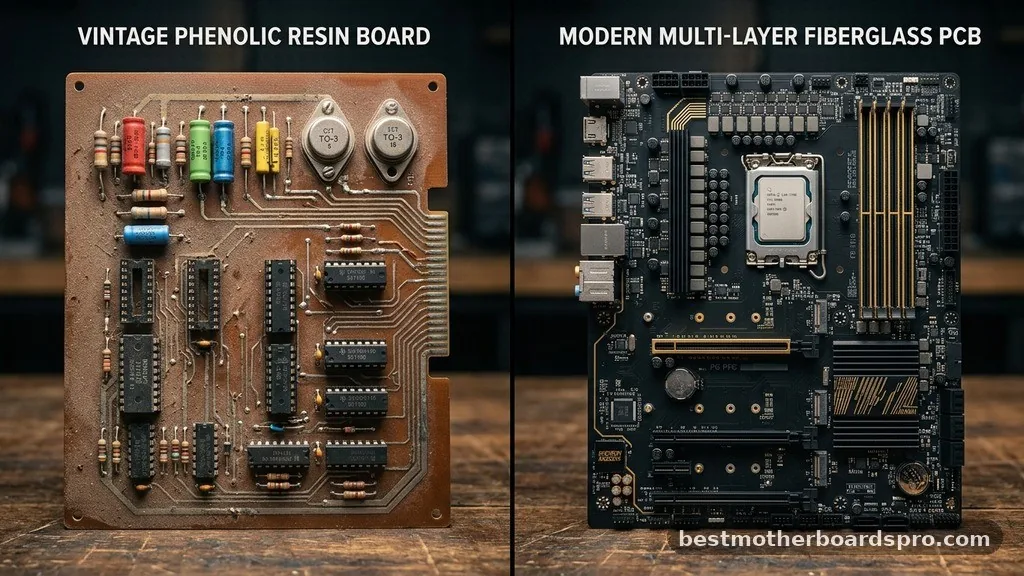
Different tiers of motherboards use varying levels of material quality to handle different electrical loads. High-performance boards often feature thicker copper layers to manage heat dissipation more effectively during intense gaming or professional workloads.
| Material/Component | Primary Function | Common Material |
|---|---|---|
| Substrate | Structural support and insulation | FR-4 (Epoxy/Fiberglass) |
| Circuit Traces | Data and power signaling | Copper |
| Contact Points | Connectivity for hardware | Gold or Nickel plating |
| Soldering | Securing components | Tin-lead or Lead-free alloys |
Addressing Common Misconceptions
A common question is whether a motherboard is essentially just a piece of plastic. While plastic (epoxy resin) is a major component, it is only part of the story. The integration of silicon in the chips, copper in the traces, and precious metals in the connectors makes it a complex hybrid of materials.
Another gap in common knowledge involves the storage of data; people often ask if the board itself stores information. While the board hosts the BIOS chip, which contains basic firmware, it does not store your files or operating system. That task is relegated to your storage drives, such as an SSD or HDD.
Environmental Sensitivity and Durability
Because a motherboard is made of sensitive materials like thin copper and complex silicon, it is susceptible to damage from environmental factors. Humidity can lead to corrosion of the metal traces, while static electricity can easily fry the microscopic components on the board.
This is why you should always use an anti-static wrist strap when handling internal hardware. Heat is another significant enemy; when a system runs too hot for too long, the thermal expansion and contraction can eventually cause the solder joints to crack, leading to permanent connection failures.
FAQ
What is the main material used in a motherboard?
The primary material is FR-4, which is a composite of woven fiberglass cloth and an epoxy resin binder. This material is chosen for its excellent electrical insulation properties, thermal resistance, and structural strength, providing a stable foundation for the complex circuitry required in modern computing.
Do motherboards store data?
A motherboard does not store user data like photos or documents. It contains a small chip holding the BIOS or UEFI firmware, which tells the computer how to start up. All your personal files and software remain on your storage drives, such as an SSD or hard disk.
What can damage a motherboard?
The most common causes of damage include physical impacts, electrical surges, overheating, and exposure to moisture. Static electricity is particularly dangerous during handling, as it can cause invisible damage to the delicate integrated circuits, leading to total system failure or intermittent issues over time.
Can I build my own motherboard?
While you can assemble a system by connecting components to a motherboard, you cannot realistically manufacture a functional one at home. The process requires industrial-grade photolithography, chemical etching, and precision robotic assembly to place thousands of microscopic components onto the multilayered substrate accurately.
Final Thoughts on Motherboard Construction
Understanding what a motherboard is made of reveals the incredible engineering packed into your computer’s central hub. From the fire-retardant fiberglass base to the gold-plated contacts and silicon-based chips, every material serves a specific purpose in moving electricity and data efficiently. By recognizing these components, you gain a better perspective on how to maintain your hardware and why proper cooling and handling are so essential.
Whether you are a casual user or a PC enthusiast, respecting the complexity of this foundational circuit board ensures your system performs reliably for years to come. If you have further questions about your specific build or need advice on hardware maintenance, feel free to reach out and explore more about the fascinating world of computing architecture.



