

Constructing a computer’s main circuit board from scratch represents one of the most challenging feats for a hardware enthusiast. While mass-produced units roll off automated assembly lines in massive factories, the process of designing and prototyping a custom motherboard requires a deep understanding of electrical engineering, signal integrity, and manufacturing workflows.
You aren’t just soldering parts; you are orchestrating complex data pathways that allow a processor to communicate with memory and peripherals at gigahertz speeds. This article explores the technical reality behind creating these sophisticated hardware foundations, moving from the conceptual design phase to the final assembly of a functional printed circuit board.
The Architecture of Modern Motherboards

A motherboard serves as the central nervous system of any computing device. Its primary purpose is to provide electrical connectivity between the central processing unit, system memory, and various expansion slots.
To successfully create one, you must first master the concept of the printed circuit board, or PCB. This is the physical foundation, typically made of fiberglass-reinforced epoxy resin, which holds the conductive copper tracks.
Designing the layout requires specialized CAD software, such as Altium Designer or KiCad. These tools allow you to map out the electrical schematic before translating those connections into a physical board layout.
You must account for signal interference, power distribution planes, and the physical constraints of the components you intend to use. Without a precise design, the board will fail to boot or, worse, cause electrical shorts that destroy your expensive silicon components.
Essential Components and Materials
When you look at a motherboard, you see a dense forest of capacitors, resistors, and integrated circuits. Each of these parts plays a critical role in the overall health of the system. You cannot simply pick components at random; they must be compatible with the specific chipset and socket architecture you have chosen for your project.
- CPU Socket: The physical interface that connects the processor to the board.
- Chipset: The set of chips that manages data flow between the processor, memory, and storage.
- Voltage Regulator Modules (VRMs): Essential for converting power from the power supply into stable voltages for the CPU.
- Capacitors and Inductors: Components that filter electrical noise and ensure a steady power delivery.
- PCIe Lanes: High-speed pathways designed for communication with graphics cards and expansion devices.
The PCB Fabrication Process
Once your design is finalized, the next phase involves translating that digital file into a physical board. This is rarely done at home for multi-layer motherboards, as the precision required for high-speed signal traces exceeds the capability of standard hobbyist equipment. Most professionals send their design files to a specialized fabrication house.
The manufacturing process involves several distinct steps:
- Printing the inner layers of the copper foil onto the substrate.
- Etching away excess copper to reveal the desired circuitry.
- Laminating the layers together under high heat and pressure.
- Drilling holes for vias, which allow signals to jump between different layers of the board.
- Applying a solder mask to protect the copper and prevent accidental bridges.
Signal Integrity and Layer Management
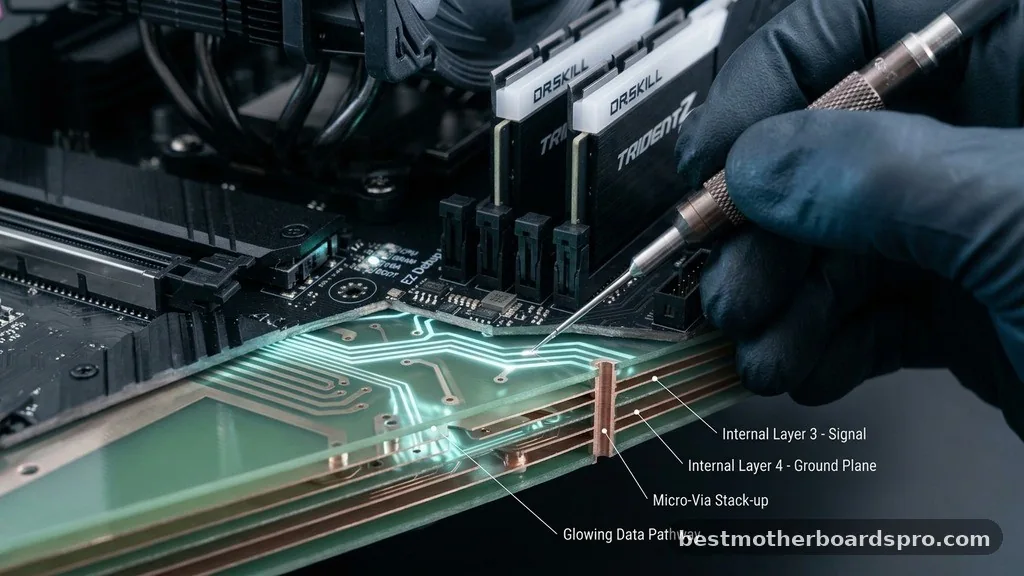
Modern computing relies on extremely high-frequency signals. If the copper traces are not perfectly managed, electromagnetic interference can corrupt data packets, leading to system instability or total failure. This is why professional boards often use six to twelve layers to isolate high-speed data lines from noisy power delivery lines.
When designing your own, you must prioritize “trace impedance.” This refers to the resistance of the path the electrical signal travels. If the impedance varies, the signal reflects back, causing data errors.
Engineers use ground planes—large sheets of copper—to act as a shield and a return path for current. Managing these planes is the most difficult part of the design phase.
| Feature | Hobbyist Approach | Industrial Standard |
|---|---|---|
| Layer Count | 2-4 Layers | 8-16+ Layers |
| Component Mounting | Manual Soldering | Automated SMT Pick-and-Place |
| Trace Precision | Broad tolerances | Micron-level accuracy |
| Design Verification | Physical testing | Simulation and EMI testing |
Addressing Common Technical Gaps
Many enthusiasts wonder if it is possible to “build” a motherboard using off-the-shelf parts or simple breadboards. The reality is that for modern CPUs, it is virtually impossible to build a functioning board using a breadboard or perfboard. The high-speed signals required by modern memory standards, like DDR4 or DDR5, simply cannot survive the parasitic capacitance and inductance inherent in non-PCB wiring.
If you are serious about this, start by designing a simple 8-bit computer board using a microcontroller like an Arduino or a 6502 processor. This allows you to learn the fundamentals of PCB design and soldering without the overwhelming complexity of modern high-speed buses. You must ensure your power distribution is clean, as even a small voltage ripple can crash a sensitive processor.
Testing and Debugging
After the board is manufactured and the components are soldered, the final phase is testing. You will need a multimeter to check for continuity and ensure there are no short circuits between power and ground. Even if the board looks perfect, cold solder joints or microscopic cracks in the traces can cause intermittent issues that are notoriously difficult to track down.
Before you ever connect a CPU to your custom board, perform “power-on” tests. Measure the voltage at the pins of the CPU socket to ensure the VRMs are providing the correct values.
If the voltages are stable, you can proceed to attempt a boot sequence. Expect to spend a significant amount of time debugging your design; it is rare for a first-iteration board to work flawlessly on the first try.
FAQ
Can I build a modern motherboard at home?
While you can design and order a PCB for a simple 8-bit system, building a modern, high-performance motherboard at home is nearly impossible. The signal integrity requirements for modern CPUs and RAM modules require advanced multi-layer manufacturing and industrial-grade equipment that is not accessible to the average hobbyist.
What is the hardest part of designing a motherboard?
The most difficult aspect is managing signal integrity and power distribution. Ensuring that high-speed data signals do not interfere with each other while providing clean, stable voltage to the processor requires advanced knowledge of electromagnetic physics and precise layout techniques that take years to master effectively.
What software is used for motherboard design?
Professionals typically use industry-standard electronic design automation software like Altium Designer, Cadence Allegro, or Mentor Graphics. For hobbyists or students, KiCad and Eagle are popular choices that offer powerful features for schematic capture and PCB layout, allowing users to create complex circuit boards for various custom projects.
Is it cheaper to build a motherboard than to buy one?
It is significantly more expensive to build your own. Mass production benefits from economies of scale, allowing manufacturers to produce boards for a fraction of the cost of a custom prototype. A single custom board incurs high costs for PCB fabrication, component sourcing, and the time required for testing and debugging.
Conclusion
Creating a motherboard from scratch is an ambitious project that bridges the gap between software logic and physical hardware. By focusing on the fundamentals of PCB design, mastering the use of CAD tools, and understanding the critical importance of power delivery, you gain a deep appreciation for the hardware that powers our digital lives. Whether you start with a simple microcontroller or attempt a more complex system, the process provides invaluable insight into how electrical signals become the foundation for computation.
Start small, verify your designs through simulation, and treat every failure as a lesson in engineering. By taking this iterative approach to making a motherboard, you develop the technical skills necessary to push the boundaries of what you can build yourself.



