


If you are currently planning a high-end PC build, you have likely run into the term EATX while browsing parts. Knowing what an EATX motherboard actually is becomes essential when you want to squeeze maximum performance out of your workstation or gaming rig. These boards are built for enthusiasts who need more space for components, better cooling potential, and a higher density of connectivity options compared to the standard desktop hardware you find in most retail stores.
By understanding the physical footprint and the specific requirements of these larger boards, you can avoid the frustration of buying a chassis that simply won’t hold your hardware. We will break down the exact dimensions, the hardware ecosystem, and the practical trade-offs involved in choosing an extended-form factor over a traditional build.
Defining the EATX Form Factor
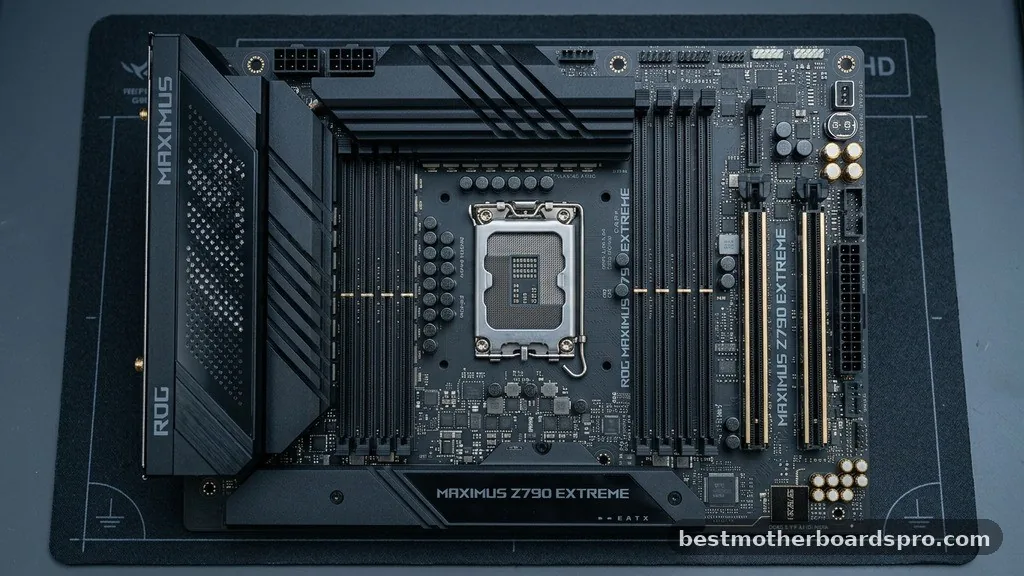
An EATX motherboard, or Extended ATX, serves as the heavy-duty standard for high-performance computing. While the common ATX board measures 12 by 9.6 inches, an EATX board typically spans 12 by 13 inches. This extra surface area provides a massive advantage for developers, engineers, and power users who need to push their systems to the absolute limit.
Because these boards are physically wider, they offer more room for complex circuitry. You will often see extra power delivery phases to support overclocking, additional RAM slots, and more robust thermal management solutions. Manufacturers utilize this space to pack in features that would otherwise be impossible on a smaller layout.
Comparing Motherboard Standards
Choosing the right size depends entirely on your specific goals for the build. To help you visualize the difference in scale, the following table compares common form factors you will encounter in the market today.
| Form Factor | Dimensions (Inches) | Best Use Case |
|---|---|---|
| Mini-ITX | 6.7 x 6.7 | Compact builds and media centers |
| Micro-ATX (mATX) | 9.6 x 9.6 | Budget and mid-range gaming |
| Standard ATX | 12 x 9.6 | Mainstream enthusiasts |
| EATX | 12 x 13 | Workstations and extreme gaming |
Why Choose EATX Over Standard ATX
The primary reason to choose an EATX motherboard is expansion. If you are building a system that requires multiple high-end GPUs or specialized PCIe cards, the extra width of an EATX board is a lifesaver. Standard boards often suffer from congestion when you populate all available slots, leading to thermal throttling or physical interference between components.
Beyond just physical space, these boards are often the flagship products for brands. This means you get the best of the best:
- Enhanced power delivery systems for stable CPU overclocking.
- More USB ports with higher speed, such as 20 Gbps or even 40 Gbps connectivity.
- Advanced cooling headers for custom liquid loops.
- Integrated high-end audio and networking, including the latest Wi-Fi standards.
- More slots for M.2 NVMe storage, allowing for massive high-speed arrays.
Compatibility and Case Requirements
The biggest hurdle for anyone building with an EATX motherboard is the case. Not every chassis labeled as a “mid-tower” can physically accommodate the width of these boards. You need to verify the motherboard tray dimensions in your chosen case before you commit to the purchase.
Some cases might technically fit the board but will cover up the cable management grommets. This makes building a clean system much harder.
Always check the manufacturer’s specifications for “E-ATX support” specifically. Even then, some cases require you to use specific standoffs or remove cable covers to make the fitment work.
Addressing Topical Gaps: Cooling and Power

A common misconception is that larger boards inherently run hotter. In reality, the increased surface area often allows for better component spacing, which helps with airflow around the VRMs and chipset. However, because these systems are usually paired with high-TDP processors, you need a power supply unit that can handle the increased load.
Many EATX boards feature additional 8-pin EPS power connectors to ensure the CPU receives steady voltage under heavy stress. You should plan your power supply choice carefully to ensure you have enough cables to populate all the power headers on the board. Ignoring these extra power requirements can lead to system instability during heavy rendering or gaming sessions.
Installation Challenges
Installing an EATX board into a cramped case is a lesson in patience. You have less room to maneuver your hands, especially when plugging in the 24-pin power cable or the front-panel connectors. It is often wise to install your CPU, RAM, and M.2 drives before mounting the board into the case.
Take your time with the standoff configuration. Because EATX boards are wider, they often rely on additional mounting points that standard ATX boards do not use. If you miss a standoff, you risk bowing the PCB, which can lead to hairline fractures or short circuits over time.
Performance and Longevity
When you invest in an EATX motherboard, you are essentially buying into a platform designed for longevity. These boards are engineered with the expectation that they will be pushed hard for several years. The build quality, including the reinforcement of PCIe slots and the thickness of the PCB, is typically superior to entry-level boards.
If you are an AMD enthusiast, you will find that many top-tier AM5 motherboards adopt the EATX form factor to accommodate the complex requirements of modern high-core-count processors. This gives you a future-proof foundation that can handle generational upgrades without requiring a complete system overhaul.
FAQ
Is EATX better than ATX for gaming?
EATX is not necessarily faster, but it offers better features for extreme gaming. If you need multiple GPUs, massive storage arrays, or advanced overclocking headers, it is better. For a standard single-GPU build, a high-end ATX motherboard will perform just as well as an EATX model.
Can I fit an EATX motherboard in a standard ATX case?
Usually, no. Most standard ATX cases are not wide enough to accommodate the 13-inch width of an EATX board.
While some mid-towers claim compatibility, they often block cable management holes. You should always confirm that your specific case supports EATX dimensions before attempting the build.
Do EATX motherboards have more RAM slots?
While many EATX motherboards do come with four slots, some specialized workstation EATX boards feature eight DIMM slots. This allows for massive amounts of memory, which is beneficial for professional tasks like 3D rendering, video editing, and running virtual machines, far exceeding typical gaming needs.
Are EATX motherboards more expensive?
Yes, they are generally more expensive than ATX boards. Because they are marketed as flagship products, they include extra components, better power delivery, and premium features like advanced Wi-Fi and audio. You are paying for the increased surface area and the high-end components required to populate that space.
Choosing the Right Foundation
Selecting the right motherboard is the most critical decision in your build process. By opting for an EATX motherboard, you are prioritizing expansion, stability, and future-proofing over raw space-saving. It is a commitment that requires careful selection of your chassis, but the reward is a system that can handle anything you throw at it, from high-fidelity gaming to heavy production workloads.
Take the time to verify your case dimensions and power requirements before finalizing your build. Once you have the right space and power, you will find that the ease of working with a larger board pays off in the long run. Whether you are building a workstation or a top-tier gaming rig, understanding the nuances of EATX hardware ensures your project succeeds on the first try.



